
TV and broadband
How To Choose A VPN For Your Smart TV
On a Google TV or Android TV running Android 8 or later, try Proton Free directly on the television. On a Samsung Tizen or LG webOS set, Windscribe has no native app. Use an existing compatible HDMI player if that is where you watch, or a VPN router if you need to cover the television’s own apps.
Which VPN Can Your Television Install?
On Google TV, search the Apps tab from an adult profile. Google’s installation guide explains how app installation works across profiles. Proton’s TV app runs on Android TV and Google TV with Android 8 or later. It can connect on Proton Free with an automatically selected location. Proton reserves its streaming support for paid plans.
On an LG television, find the model number and webOS version before looking up a VPN. LG UK’s app-availability guide explains the country, model and software checks. Samsung uses Smart Hub. Windscribe confirms it has no native app for Samsung Tizen or LG webOS. If another provider advertises support for your TV, check whether it means an actual app, router instructions or a change of DNS settings.
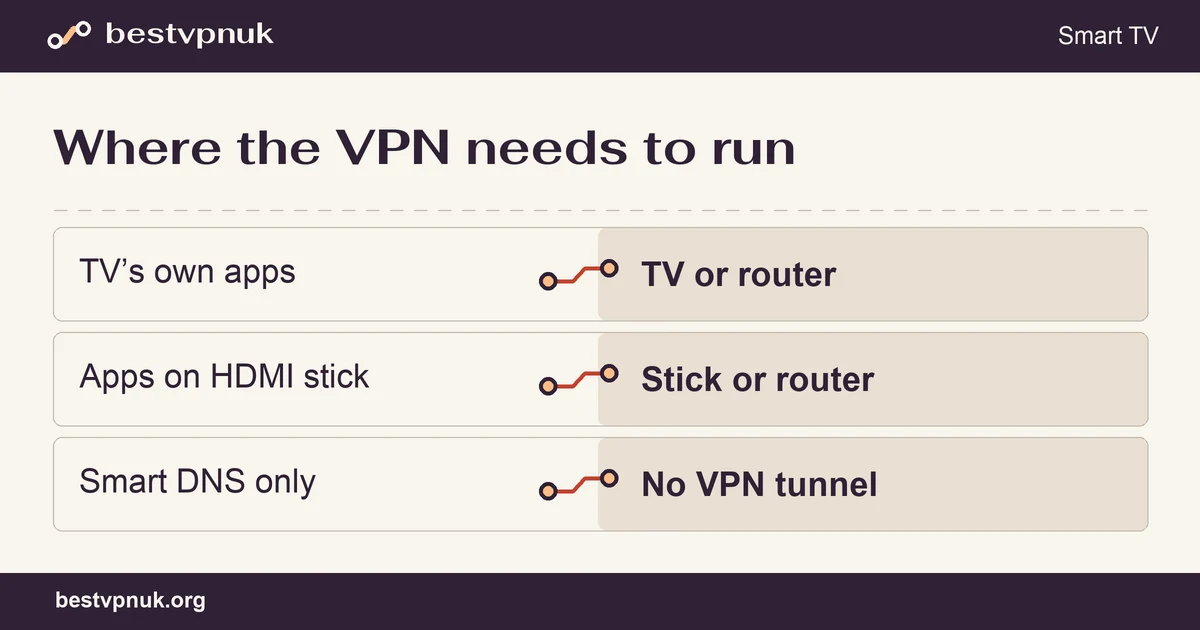
- TV’s own apps
- TV or router
- Apps on HDMI stick
- Stick or router
- Smart DNS only
- No VPN tunnel
Choose Between An HDMI Player And A Router
Take a Liverpool flat with an LG screen and a Fire TV Stick. If everyone opens the stick’s home screen to watch, a VPN on the stick covers that use without changing a housemate’s games console or work laptop. If you launch the same programme from the LG home screen, the stick’s VPN will not carry that traffic. Look at the selected input: LG’s HDMI control feature means the same remote may operate a connected device.
A VPN-capable router can cover a TV without a native app. For example, TP-Link’s VPN client guide shows how to route selected devices. That option involves hardware and configuration, so price it against moving your viewing to a player you already own. A smart DNS setting alone does not provide the protection of an encrypted VPN connection, as NordVPN explains.
Follow One Programme From Remote To Screen
Start the programme as you normally would. Identify which device launches the app, confirm the VPN status on that device or its router, then try a programme available to your account. If it fails, try the same app on the same device with the VPN off. This compares the route without changing the app, account or input at the same time.
Your Next Step
Check Android TV and Google TV compatibility.
Provider links are unpaid. How we compare VPNs.