
Performance and privacy
Which VPN Is Fastest On A UK Connection?
Surfshark had the fastest downloads and NordVPN the lowest ping in a London benchmark of three paid services. The results give you a shortlist. The deciding measure at home is whether your own uploads, downloads or calls improve enough to justify the price.
Which Provider Led The UK Tests?
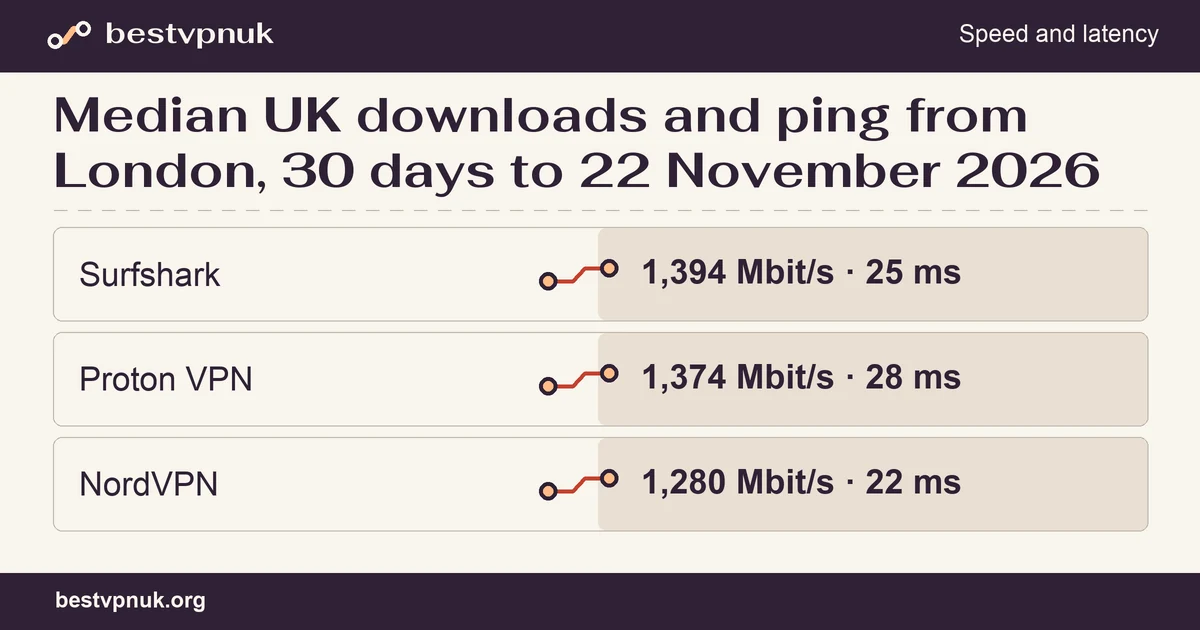
Over the 30 days to 22 November 2026, VPN Speed Data recorded 1,501 successful tests from one London datacentre to four UK exit cities. It compared median download speeds across those cities. Surfshark led at 1,394 Mbit/s, followed by Proton VPN at 1,374 and NordVPN at 1,280. NordVPN had the lowest median ping at 22 ms, against 25 ms for Surfshark and 28 ms for Proton. Read VPN Speed Data’s UK results.
The tester uses WireGuard for Surfshark and Proton, and NordLynx for NordVPN. It discloses affiliate funding. Its figures reflect successful connections on a multi-gigabit datacentre line. If your home download tops out at 100 Mbit/s, the 20 Mbit/s gap between Surfshark and Proton in that test gives you little reason on its own to switch. How the London measurements are made.
Compare UK plans for download speed and gaming latency
- Surfshark
- 1,394 Mbit/s · 25 ms
- Proton VPN
- 1,374 Mbit/s · 28 ms
- NordVPN
- 1,280 Mbit/s · 22 ms
Build A Baseline You Can Repeat
On home broadband, connect a laptop to the router by Ethernet if you can. That removes local Wi-Fi conditions from the comparison. Pause other heavy transfers, keep the same cable and run three ordinary speed checks to the same named test server. Sort the results separately for download, upload and ping, and keep the middle number for each. If you need a mobile result, stay in the same place and use the same mobile connection throughout. Ofcom’s broadband and Wi-Fi troubleshooting.
Now choose the UK VPN city you would actually use. Re-run the three tests without changing the speed-test destination. If the testing app silently moves its own endpoint when you connect the VPN, record that change and repeat with a fixed destination. Otherwise your comparison changes two things at once.
Calculate What The Tunnel Changes
Suppose the normal download speed is 120 Mbit/s with 14 ms ping. Through a London VPN exit it is 96 Mbit/s with 22 ms ping. Divide 96 by 120 and multiply by 100. The connection kept 80% of its download speed. Subtracting 14 from 22 shows the route added 8 ms of latency. Do the same exercise separately for uploads. A good download figure says little about sending large files.
For example, a 600 MB file contains roughly 4,800 megabits. At a steady upload rate of 20 Mbit/s the transfer takes about four minutes. At 10 Mbit/s it takes about eight. These are idealised estimates. A cloud service, Wi-Fi or another household upload can extend the real time.
Compare Like For Like Before Paying
NordVPN and Surfshark both list Manchester and London. If comparing those two for a household in Liverpool, choose the same city and keep the test destination fixed, then switch the order on a second evening. Proton explains why server load, distance, device and protocol can all affect measured VPN speed. NordVPN’s UK cities · Surfshark’s UK cities · Proton’s performance factors.
Try the service you already have first. If it meets your upload deadline and video calls stay stable in the evening, you have a reason to keep it. When two plans meet those needs, compare what each costs for the devices you want to connect.
Your Next Step
See the latest measurements across the four UK cities.
Provider links are unpaid. How we compare VPNs.